Workspace95
A route-driven desktop, window host, and taskbar.
Workspace95 owns or binds logical window state and chooses compact or overlapping presentation for the available size.
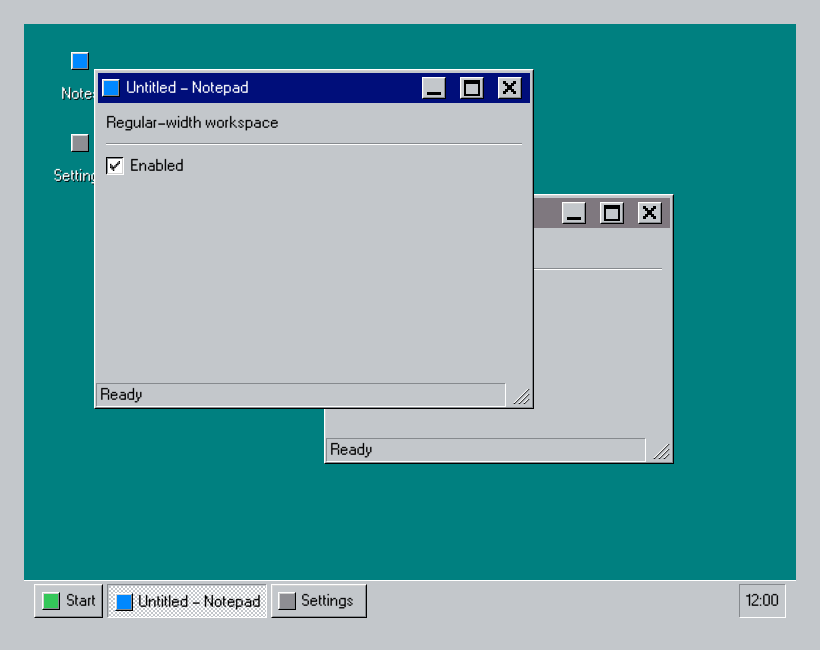
Use it
import Swift95
import SwiftUI

private enum WorkspaceRoute: Hashable {
  case notes
  case settings

  var title: String {
    self == .notes ? "Untitled - Notepad" : "Settings"
  }
}

struct Workspace95Example: View {
  @State private var state = WorkspaceState95<WorkspaceRoute>(
    openWindows: [.notes, .settings],
    activeWindow: .notes,
    windowFrames: [
      .notes: CGRect(x: 70, y: 45, width: 440, height: 340),
      .settings: CGRect(x: 300, y: 170, width: 350, height: 270)
    ]
  )

  var body: some View {
    Workspace95(
      for: WorkspaceRoute.self,
      state: $state,
      presentation: .windowed
    ) { route in
      WorkspaceWindow95(route.title) {
        workspaceIcon(route == .notes ? .blue : .gray)
      } taskBarIcon: {
        workspaceIcon(route == .notes ? .blue : .gray)
      } content: {
        VStack(alignment: .leading, spacing: 12) {
          Text95(route == .notes ? "Regular-width workspace" : "Display settings")
          Divider95()
          Checkbox95("Enabled", isOn: .constant(true))
        }
        .padding(12)
        .frame(maxWidth: .infinity, maxHeight: .infinity, alignment: .topLeading)
      }
      .statusBar95 { Text95("Ready") }
    } desktop: {
      Desktop95(allowsShortcutMovement: false, shortcutActivation: .doubleClick) {
        DesktopShortcut95("Notes", value: WorkspaceRoute.notes) {
          workspaceIcon(.blue)
        }
        DesktopShortcut95("Settings", value: WorkspaceRoute.settings) {
          workspaceIcon(.gray)
        }
      }
    } taskBar: {
      TaskBar95(
        "Start",
        icon: {
          workspaceIcon(.green)
        },
        menu: {
          StartMenu95 {
            WorkspaceLink95("Notes", value: WorkspaceRoute.notes)
            WorkspaceLink95("Settings", value: WorkspaceRoute.settings)
          }
        },
        tray: {
          Text95("12:00")
        })
    }
  }

  private func workspaceIcon(_ color: Color) -> some View {
    color.frame(width: 18, height: 18).bevel95(.raised)
  }
}
Essential behavior
RoutesOne Hashable route type identifies shortcuts, windows, and tasks.
LifetimeOpen windows remain mounted while inactive or minimized.
PresentationAutomatic mode resolves to compact or windowed using WorkspaceConfiguration95.