Tabs95
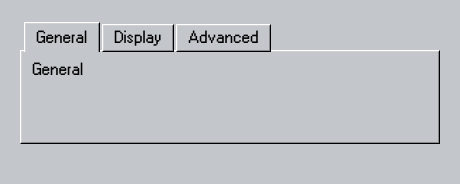
A typed tab strip and raised content panel.
Tabs95 makes the current tab explicit through a Hashable selection binding and an ordered set of Tab95 values.
Use it
import Swift95
import SwiftUI

struct Tabs95Example: View {
  private enum Section: String, Hashable {
    case general = "General"
    case display = "Display"
    case advanced = "Advanced"

    var title: String { rawValue }
  }
  @State private var section = Section.general

  var body: some View {
    Tabs95(
      selection: $section,
      tabs: [
        Tab95("General", value: Section.general),
        Tab95("Display", value: Section.display),
        Tab95("Advanced", value: Section.advanced)
      ]
    ) { selected in
      Text95(selected.title)
        .frame(maxWidth: .infinity, minHeight: 70, alignment: .topLeading)
    }
    .frame(width: 420)
  }
}
Essential behavior
Type safetyTab values and the selection binding share one Hashable type.
OrderingThe tab array determines visual and keyboard order.
Native APIsTab95.swiftUI(_:) supports per-tab keyboard and accessibility modifiers.