ScrollView95
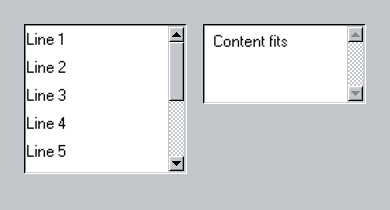
A vertical SwiftUI scroll view with a classic sunken viewport and indicator.
ScrollView95 composes native scrolling with the library’s track, thumb, line buttons, and accessibility actions.
Use it
import Swift95
import SwiftUI

struct ScrollView95Example: View {
  var body: some View {
    HStack(alignment: .top, spacing: 16) {
      ScrollView95(lineIncrement: 28) {
        LazyVStack(alignment: .leading, spacing: 0) {
          ForEach(1...10, id: \.self) { line in
            Text95("Line \(line)")
              .frame(maxWidth: .infinity, alignment: .leading)
              .frame(height: 28)
          }
        }
      }
      .frame(height: 150)

      ScrollView95 {
        Text95("Content fits")
          .frame(maxWidth: .infinity, alignment: .leading)
          .padding(8)
      }
      .frame(height: 80)
    }
  }
}
Essential behavior
AxisProvides a vertical scrolling container.
IndicatorThe classic indicator can be hidden or transformed independently.
Native APIsUse swiftUI(_:) to configure the embedded ScrollView.