Button95
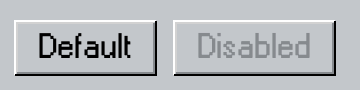
A native SwiftUI button with raised, pressed, and disabled Swift95 styling.
Button95 keeps SwiftUI button behavior while applying the active
Theme95.
Use it
Section titled “Use it”import Swift95import SwiftUI
struct Button95Example: View { var body: some View { HStack { Button95("Default") {} Button95("Disabled") {} .disabled(true) } }}Essential behavior
Section titled “Essential behavior”| Concern | Behavior |
|---|---|
| State | Draws raised, pressed, and disabled appearances from the active theme. |
| Semantics | Preserves the native action, role, enabled state, focus, and accessibility label. |
| Custom labels | Use the view-builder initializer for icons or composed labels. |
| Native APIs | Use swiftUI(_:) to add keyboard shortcuts and other SwiftUI button modifiers. |