Menu95
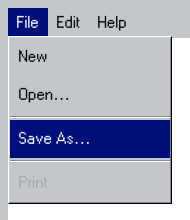
Classic pull-down menus for Swift95 workspace windows.
Menu95 groups
MenuItem95 commands and
MenuDivider95 separators in a
workspace window menu bar.
Use it
Section titled “Use it”import Swift95import SwiftUI
struct Menu95Example { @MainActor static func makeWindow() -> WorkspaceWindow95 { WorkspaceWindow95( "Notes", icon: { Color.blue.frame(width: 16, height: 16) } ) { TextEditor95(text: .constant("")) } .menuBar95 { Menu95("File") { MenuItem95("New") {} MenuItem95("Open…") {} MenuDivider95() MenuItem95("Save As…") {} MenuDivider95() MenuItem95("Print", isEnabled: false) {} } } }}Essential behavior
Section titled “Essential behavior”| Concern | Behavior |
|---|---|
| Placement | Add menus to WorkspaceWindow95 with menuBar95. |
| Content | Builders support items, dividers, conditions, and loops. |
| States | Items render enabled, highlighted, pressed, and disabled states. |
| Input | Supports pointer hover as well as touch press-and-drag selection. |